 SmartSpectra SDK
Troubleshooting
Solutions to common build, runtime, and integration issues with the SmartSpectra Swift SDK.
Installation & Setup
Package not found in Xcode
Ensure you're adding the package via File → Add Package Dependencies..., entering https://github.com/Presage-Security/SmartSpectra-Swift, and selecting Branch → main. Specific version tags may not exist — branch is required.
If you pasted a subdirectory URL such as /tree/main/swift/sdk, replace it with the repository root URL above. Swift Package Manager resolves the package from the repo root.
Build fails on simulator
The SDK requires a physical device with a camera. Select a real device target in Xcode — the simulator is not supported.
Camera & Permissions
NSCameraUsageDescription missing
In Xcode:
- Select your app target.
- Open the
Infotab. - Add a new row for
Privacy - Camera Usage Description. - Set the value to
This app needs camera access to measure vitals.
The SDK fails gracefully with a clear runtime error if this key is absent or empty.
or
Add to your Info.plist:
<key>NSCameraUsageDescription</key>
<string>This app needs camera access to measure vitals.</string>
Camera permission denied at runtime
If the user previously denied camera access, the SDK surfaces an action to open iOS Settings. Ensure your Info.plist description string clearly explains why camera access is needed — iOS shows this string in the permission prompt, and a vague description increases denial rates.
Authentication
Auth errors / measurements not starting
- Verify your API key is correct, or that your OAuth plist is present and valid.
- Ensure the device has an active internet connection.
- Check that the key or app registration is active in physiology.presagetech.com.
If processing fails immediately with a missing-auth error, make sure you set sdk.config.apiKey = "YOUR_KEY" before calling try await SmartSpectraSDK.shared.start().
OAuth not working
When registering your OAuth app, you need your Apple Org ID (Team ID, e.g. AB12CDE34F), not a certificate fingerprint. Find it in App Store Connect. Place the downloaded PresageService-Info.plist in your app's root directory — no additional code is needed.
Your app repo should look roughly like this:
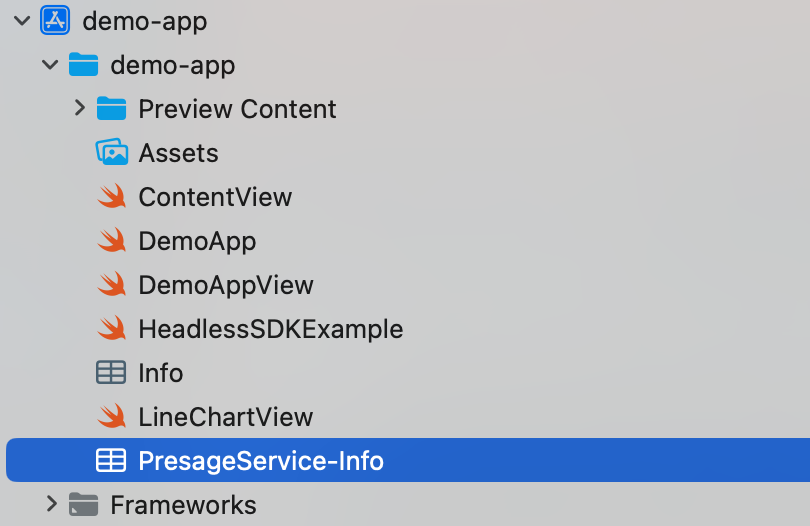
Note: Each bundle identifier can only be registered once. You cannot create multiple OAuth configs for the same bundle ID.
Metrics & Data
Pulse rate / cardio metrics not appearing
Breathing metrics are enabled by default. Cardio metrics are not. Enable them explicitly:
let sdk = SmartSpectraSDK.shared

sdk.config.requestedMetrics = SmartSpectraConfig.breathingMetrics + SmartSpectraConfig.cardioMetrics
// or
sdk.config.requestedMetrics = [
    .breathingRate,
    .pulseRate,
    .hrv
]
metricsBuffer / $metricsBuffer unresolved
MetricsBuffer was removed. Replace metricsBuffer with sdk.metrics.
The SDK now uses Swift Observation, so Combine-style $ publishers such as
sdk.$metrics are no longer available.
// Before
sdk.$metricsBuffer.sink { buffer in
    let pulse = buffer?.pulse.rate.last?.value
}

// After in SwiftUI
if let metrics = sdk.metrics {
    let pulse = metrics.cardio.pulseRate.last?.value
}
SwiftUI views automatically track reads of sdk.metrics. For UIKit or other
non-SwiftUI code, observe SDK properties with withObservationTracking and
re-arm the observation after each change.
Field mapping:
Old (metricsBuffer) | New (metrics) |
|---|---|
pulse.rate | cardio.pulseRate |
pulse.trace | cardio.arterialPressureTrace |
breathing.rate | breathing.rate |
breathing.upperTrace | breathing.upperTrace |
Important: Cardio fields now require cardio metrics to be requested explicitly, for example through
requestedMetrics. Previously,MetricsBufferprovided pulse rate regardless of configuration.
Headless Mode
processingStatus cases don't match
SmartSpectraSDK.processingStatus uses the current lifecycle states. Update any switch or comparisons:
| Old case | New case |
|---|---|
.processing | .running |
.processed | .idle |
.idle | .idle |
.starting | .starting |
.stopping | .stopping |
.error | .error |
startProcessing() / stopProcessing() unresolved or inaccessible
SmartSpectraVitalsProcessor is no longer part of the public Swift API. Use the async lifecycle methods on SmartSpectraSDK.shared:
do {
    try await SmartSpectraSDK.shared.start()

    // Observe SmartSpectraSDK.shared.metrics,
    // SmartSpectraSDK.shared.processingStatus,
    // SmartSpectraSDK.shared.validationStatus, etc.

    try await SmartSpectraSDK.shared.stop()
} catch {
    print("SmartSpectra error: \(error)")
}
For older-to-current mappings, see the iOS Migration Guide.
Getting Help
- Email: support@presagetech.com
- Submit a GitHub issue
- API reference: Swift API reference